ForgeAtlas and ForgeMimir: Building a Personal Operations Console That Actually Matches How I Work
Most productivity systems fail me because they try to become the place where thinking happens.
That sounds good in theory. One app for everything. Notes, tasks, deadlines, projects, ideas, journals, references, reminders, checklists, decisions, and maybe a calendar taped on the side.
In practice, that turns into friction.
The more a tool tries to hold every type of thought, the slower it gets. The more fields it asks for, the less likely I am to use it in the moment. The more rigid the workflow becomes, the more it starts to feel like I am working for the system instead of the system working for me.
So I stopped trying to replace my actual workflow.
I built around it.
My daily driver is still a notebook. That is where the live signal happens. Morning alignment, walk-ups, side thoughts, progress notes, interruptions, and whatever else hits during the day. It is fast, flexible, and does not require me to decide which database field a half-formed thought belongs in.
The stack exists for what comes after that.
ForgeAtlas handles the work. ForgeMimir handles the memory. The notebook stays the cockpit.
The problem
I do not have one project. I have a stack of overlapping systems.
Infrastructure work. Home lab upgrades. Writing. Career goals. Personal planning. Documentation. Experiments. Long-running ideas that are not ready to become tasks yet.
The problem was not that I lacked tools. I had plenty of tools.
The problem was that none of them matched the way the work actually moved.
Some things are actionable immediately. Some things are only context. Some things are decisions that need to be remembered later. Some things are project notes that eventually produce tasks. Some things are active for a week, then become archive material. Some things need deadlines. Some only need review.
A single flat task list cannot hold that cleanly.
Neither can a notes app pretending to be a project manager.
So the system needed separation.
Not more features. Better boundaries.
The design principle
The rule became simple:
- If it needs doing, it belongs in Atlas.
- If it needs remembering, explaining, referencing, or evolving, it belongs in Mimir.
- If it is happening today, it starts in the notebook.
That split changed everything.
Instead of trying to capture every thought in the perfect final format, I let each layer do what it is good at.
The notebook is messy by design. It catches the day.
Mimir preserves durable context.
Atlas turns selected context into action.
Archived Mimir notes become the historical record once the useful tasks have been extracted.
The system does not fight the way I think. It gives the thinking somewhere to land.
ForgeAtlas: the operations console
ForgeAtlas is the active work layer.
It is not a journal. It is not a knowledge base. It is not where big ideas go to sprawl.
It tracks the work that needs motion:
- tasks
- priorities
- dependencies
- deadlines
- blockers
- status
- review triggers
The important part is dependencies.
Most task systems let you mark something urgent without showing why it cannot move. That is not useful. In real operations, blocked work matters. A task is not just active or complete. It may be waiting on hardware, a decision, another task, a trip, a review, or a prerequisite build.
Atlas makes that visible.
That is where it started to feel less like a to-do list and more like an operations console.
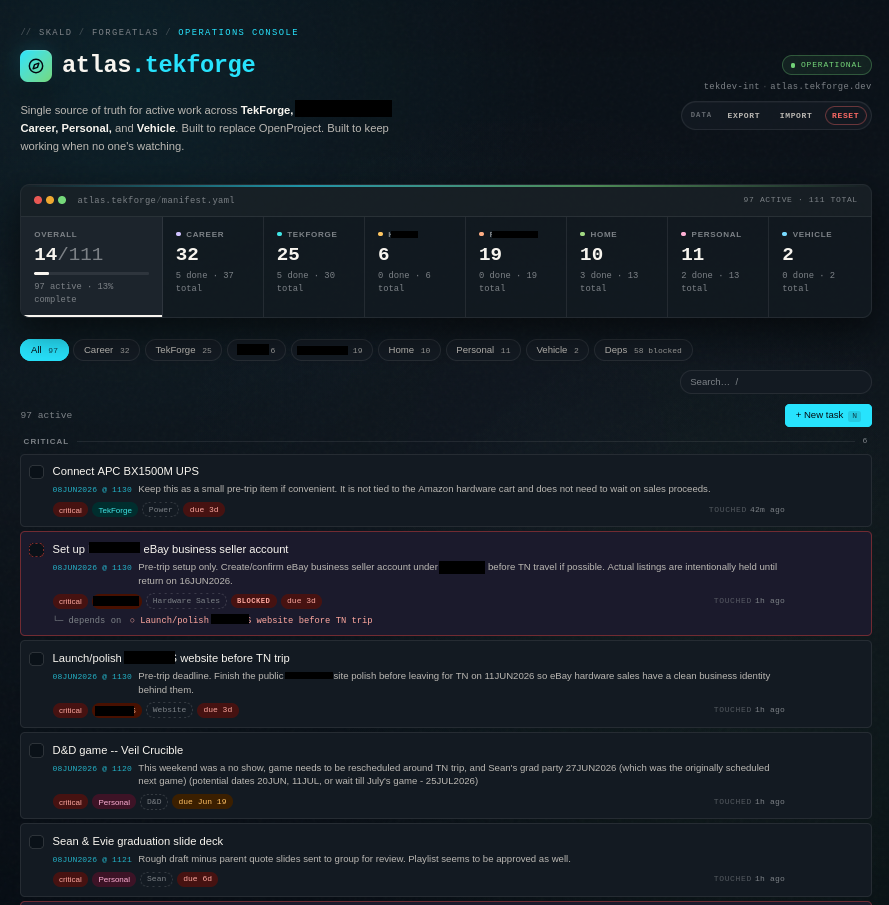
The dashboard view matters because it gives the work a shape. Active count, total count, areas, blocked tasks, categories, and search all show what is happening without making me mentally reload the whole backlog.
That is the point.
I do not need the system to motivate me.
I need it to show me the truth.
ForgeMimir: the memory layer
ForgeMimir is the long-term note layer.
It holds things that need to persist but do not necessarily need immediate action:
- SOPs
- planning notes
- project context
- research
- decisions
- long-form thoughts
- review notes
- archived reference material
Mimir is not supposed to become a second task manager. That is the trap.
If a note produces actions, those actions move into Atlas. Once the note has done its job and no longer needs active review, it can be archived. It remains available, searchable, and useful, but it stops sitting in the active lane.
That distinction is small, but it matters.
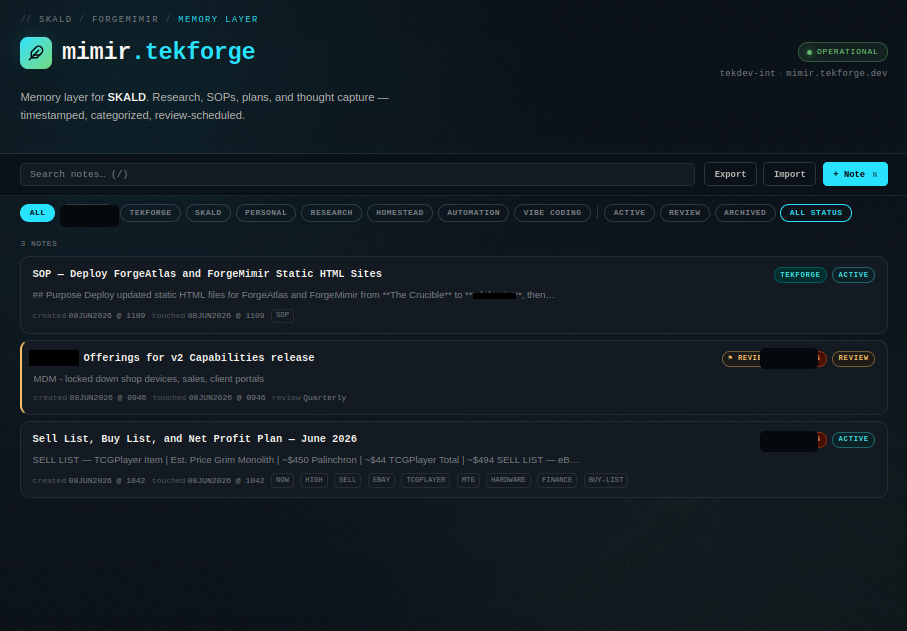
The note is not the work.
The note is the memory of why the work exists.
That keeps the task layer clean and the memory layer durable.
Why I did not just use an existing platform
I used heavier tools before. They were not bad tools. They just did not fit the shape of this system.
Traditional project management platforms are built around team coordination, formal projects, tickets, assignments, and reporting structures. That makes sense in the right environment.
But for a personal infrastructure stack, it creates too much ceremony.
I did not need a corporate project platform.
I needed a low-friction operational layer that understood my categories, my cadence, my review style, my dependencies, and my habit of turning messy thought into structured execution after the fact.
So I built the smaller thing.
Static HTML. JSON import and export. Self-hosted. Easy to inspect. Easy to back up. Easy to move. The boring architecture is the feature.
The notebook did not go away
This is the part most productivity tooling gets wrong.
The goal was never to eliminate the notebook.
The notebook is still faster than any interface I can build. It can handle fragments, arrows, half-thoughts, scribbles, interruptions, sketches, and daily mess without asking anything from me.
That is valuable.
What changed is that the notebook no longer has to be the long-term storage system too.
I used to rely on physical markers, paperclips, and memory to know what still mattered. Now the notebook can stay immediate. The important pieces graduate into Atlas or Mimir when they are ready.
The notebook is the cockpit. Atlas and Mimir are the backend.
Boox is the next bridge
Right now, my Boox is mostly a weekend planning surface.
That is where weekly goals, weekend project planning, and bigger-picture notes can happen without dragging me into a normal screen environment.
Eventually, when my environment allows it, Boox becomes the full daily cockpit.
The future version is obvious:
- Handwritten capture goes into Boox.
- Important notes get OCR'd into Mimir.
- Action items get routed into Atlas.
- SKALD eventually helps classify the input and route it correctly.
That turns the current analog workflow into a self-hosted digital operations loop without losing the handwriting layer that makes it work in the first place.
The SKALD layer
The naming on the site is intentional.
Atlas is the operation layer.
Mimir is the memory layer.
SKALD is the eventual interpreter and routing layer.
That does not mean the system needs AI making decisions for me. It means the system can eventually help with translation.
Messy notes come in.
Some belong in Mimir.
Some need to become Atlas tasks.
Some are just archive material.
Some need review later.
The goal is not automation for its own sake. The goal is to reduce the amount of manual sorting required after the thinking has already happened.
Good automation does not replace judgment.
It removes avoidable friction around judgment.
What changed
The first sign that the system was working was simple: I stopped having to keep as much of it in my head.
The second sign was that dependencies became obvious.
The third was that stale notes had somewhere to go.
That matters because most personal systems collapse under their own leftovers. Old plans, half-finished ideas, completed contexts, and maybe-later notes all pile up until the system becomes emotionally expensive to open.
This design gives every item a lifecycle.
- Capture.
- Clarify.
- Convert to action if needed.
- Review.
- Archive.
That is the loop.
Personal infrastructure is still infrastructure
It is easy to dismiss something like this as a productivity project.
I do not think that is right.
This is infrastructure.
Not because it runs on servers, although it does.
It is infrastructure because it improves reliability, recovery, visibility, and execution.
It gives work a place to live.
It gives decisions a memory.
It gives active projects a control plane.
It gives future automation a structured foundation.
The same principles apply whether the system is serving a business, a lab, a household, or one overloaded brain trying to keep too many parallel tracks moving: clear boundaries, recoverable data, visible dependencies, low-friction operation, and documented process.
I did not build ForgeAtlas and ForgeMimir because I needed another productivity app.
I built them because the work finally needed an operating system.